Remote control

|
Remote control |
|
|
|
|
|||
Overview |
|
||
|
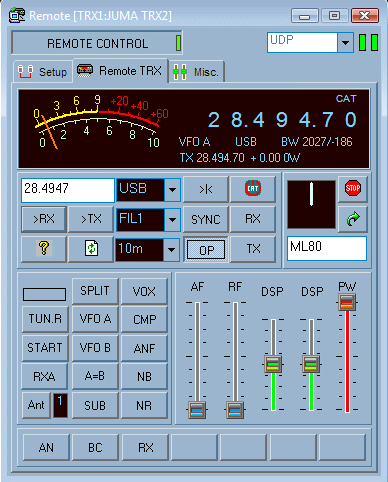
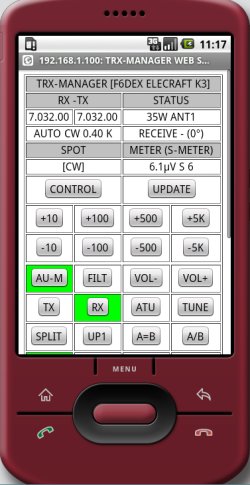
TRX-Manager lets you operate any transceiver by remote control through a local area network or the Internet... and even via a V/UHF Packet network. TCP or UDP protocols are supported. Rotors, SteppIR antennas can be remotely controlled and a Winkey Paddle can even be used for CW Keying from the Client station. Although many software solutions or alternatives exist to control a remote computer, the generic TRX-Manager's remote control mode minimizes the information being passed on the network and thus, gives faster real-time control - with minimal latency - which a DX operation requires, with very low bandwidth requirements (even practicable via Packet at 1200 Bauds !). The Remote transceiver is fully integrated (and eventually synchronized) with any local transceiver in TRX-Manager (up to 4 local transceivers can be supported at the same time). All the logging and DXIng functions are locally controlled which allows you taking full advantage of TRX-Manager and makes the trafic much more easier. Add the transmission of audio (*) and you are ready to make QSOs from anywhere with a very economical solution, a minimum wiring and a very low latency. (*) Audio (VOIP) not supported by TRX-Manager. Various third party solutions are possible (IP Sound, Skype or Mumble are recommended).
If you prefer
using a serial device server or a device like Remoterig, TRX-Manager offers specific
settings to optimize this type of operation. |
|||
|
Two modes of operation |
|
||
|
TRX-Manager has to be installed on the two computers, respectively Client and Server. Setting up a remote link is very simple and only requires knowledge of the IP address of the Server. A single click allows establishing the link between the two instances of TRX-Manager (configuring the routers and the firewall is certainly the most complex task). Two modes of
operation are available : a standard/generic
mode (supported by all
transceivers) which allows taking the control over the most important
functions of a station and a real-mode
which allows controlling your transceiver exactly as if the com-port
is open from the client station (only ICOMs, TS-480/590/2000
and Elecraft K2 & K3/KX3 are supported in real mode). |
|||
|
|
|||
|
|||